

Why automate, in the first place? The answer is to get the best results with the least amount of work. Is there room in your sales team for such effective automation? There is, indeed. This post discusses six tried-and-true automation strategies that will improve your performance while lowering your workload.
Automation Idea #1: Automate the process of contacting new web leads within minutes.
Web leads are quite valuable. You must make sure they are contacted as soon as possible. According to an MIT study, leads are 22 times more likely to convert if they are contacted within 5 minutes. But how can you make sure your sales team follows up on every lead as quickly as possible? Automation is the answer:
The web form is registered in your CRM as soon as it is completed.
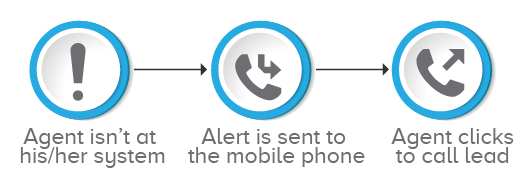
Your CRM connects to your telephony software and sends prompts to your sales reps on their computers and mobile phones.
If the rep is busy, the system automatically transfers the call to the next available sales agent, and so on, until a free sales representative dials the number.
The representative enters all pertinent customer information into their system/phone. To call, they simply need to click.
So that's it; you've ensured that every online lead is reached when they're hot. In less than 5 minutes? It's not a problem.
Automation Idea #2: Automate email campaign follow-up calls.
It's difficult to get leads to open your emails, whether they're about a new product launch, a demo, or a meetup. Isn't it reasonable to follow up when they do? I've seen effective sales teams ensuring that every client/lead who opens their email receives a follow-up call. Here's how they do it: three simple clicks.
In their CRM, they can access email campaign reports. (First Click)
They pick all contacts who have opened their email with a single click. (Second click)
Then they push all of the contacts into their dialer with another click. (Third Click)
They will now rely on their dialers to complete the task. Dialers enjoy a significant advantage. They continue to exist indefinitely. They make certain that each lead is phoned and connected to an agent. (Who can then use their charm to win over the prospect.)
Automation Idea #3 : Make sure that abandoned and missed calls don't turn into lost leads.
Capture incoming leads 24 hours a day, 7 days a week. Calls maybe missed after business hours, on holidays, or when lines are busy. Missing a call, on the other hand, should not mean missing a lead. Here's how you can set up an easy routine to make sure you never miss a missed call:
Any number that goes unanswered can be compared to CRM data by your telephony system.
If the call comes from a new lead, you can set up your system to immediately issue a new ticket.
A missed call notice can be delivered to your email. If there's a voice message, it'll be linked to the email and sent to your inbox as well.
Automation Idea #4: Keep in touch with your rep.
Salespeople are constantly on the move. Successful sales teams, on the other hand, are always connected. Their mobile phones are set up to allow them to access their CRM, make and receive calls, and receive alerts at anytime.
Automation Idea #5: Send a voice message, greetings, and notifications to all of your contacts at once.
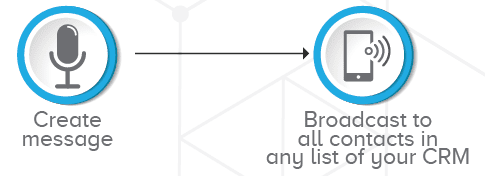
Do you need to remind qualified leads about a deadline approaching, a payment deadline approaching, or a subscription renewal approaching? Create a message with a customized IVR and a procedure that allows you to broadcast it to any or all of your CRM's contact lists with a simple click.
Automation Idea #6: Create personal ties with sticky agents
You have the option of contacting your leads anytime they choose, but what if they prefer to call you back? Is it necessary for your sales personnel to give out personal phone numbers for their leads to contact them? You may set up a basic pipeline so that once a lead phones in, they are instantly connected to the sales professional that is allocated to them.
Essentially, each of these concepts is predicated on a deep, seamless integration between the two systems that your sales team relies on the most: your CRM and their phone systems.Connect with Trigya Innovations today to get a demo on all the workflows and CRM automation process. We are an Advanced Zoho Consulting partners having happy clients all around the globe. Get started with us today.